A Roles
Each agent its own field
Claude in chat designs and analyses. Claude Code works in the shell and Docker. Codex built LadeKlar and gets the car’s data through a written contract instead of access to everything.
For years my smart home ran on a Raspberry Pi with large Node-RED flows that took days to build and maintain. Today it runs on a NUC with Linux and Docker, and I operate it together with AI agents that have real access to the system. Claude Code runs directly on the server, and I steer it from the Claude app on a Mac, PC or iPhone.
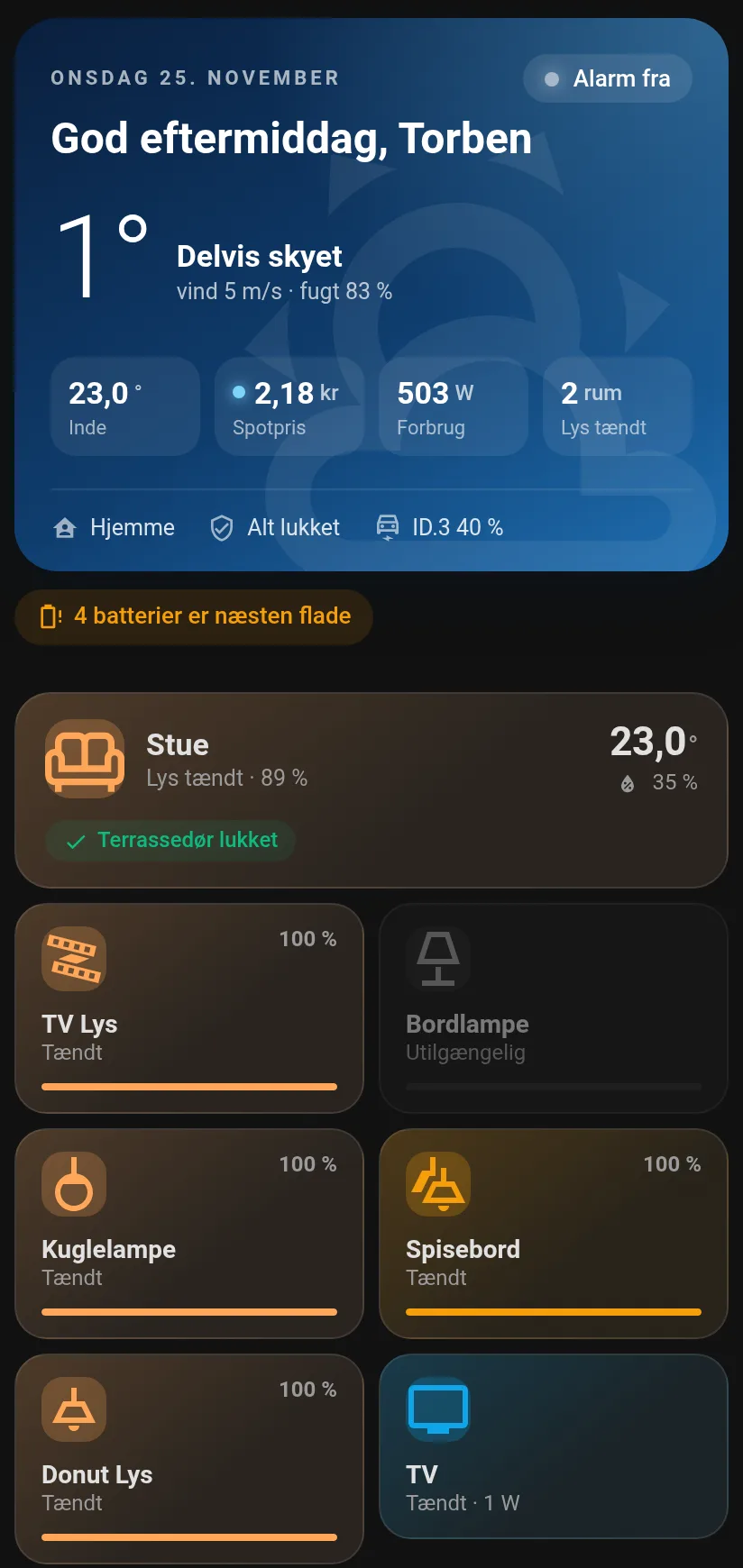
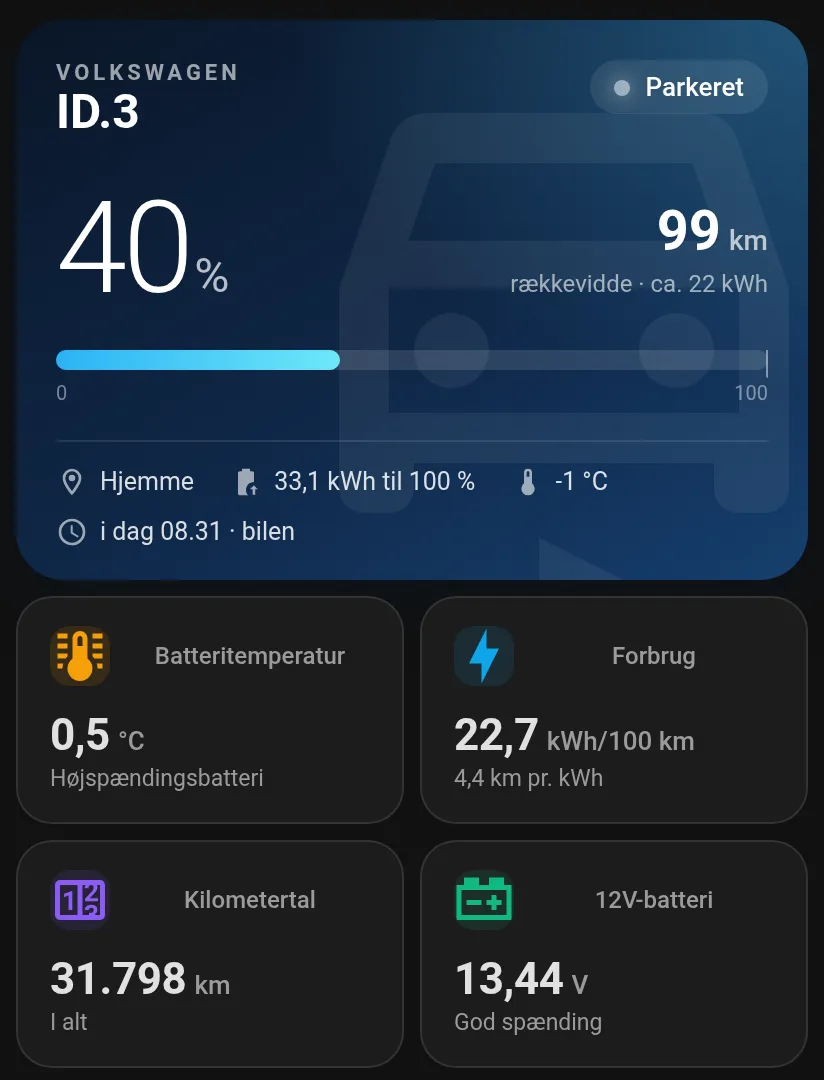
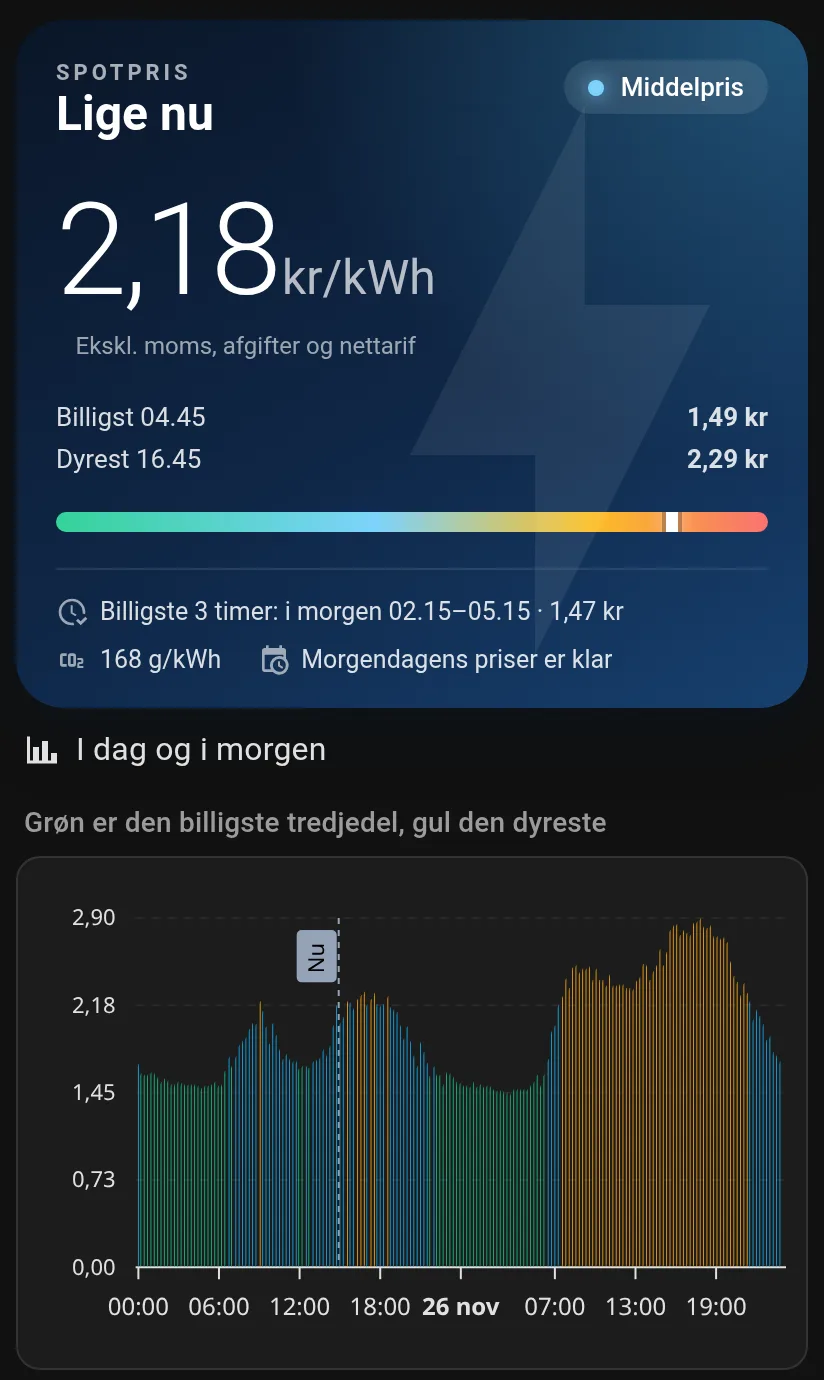
This case is about getting AI to do real operations work on a system that has to work every day for a family, without losing control. The agents have access to the shell, Docker and Home Assistant. I decide what should happen and what must not.
Linux, Docker, databases and a network that run around the clock.
Faults are found by measuring processes, write volumes and sensor events, not by guessing.
Claude in chat, Claude Code on the server and Codex each have a role and share knowledge through documents.
Narrow permissions in git, and irreversible actions are my call, not the agent’s.
It is the producer’s role: I know what should happen and why, and I make sure it is written down so others can take over.
The hard part was never getting one thing to work. It was that the system decayed quietly. The logic lived in Node-RED and the devices in Home Assistant. Five climate sensors had gone offline without anyone noticing, and a new flow could take days.
The move happened in two steps. In January 2025 the platform moved to an Intel NUC with Ubuntu and Docker. In March 2026 Claude reviewed the whole system over MCP and moved the flows into Home Assistant. Since August Claude Code has run directly on the server. Only one small flow is left in Node-RED.
Each agent has its role and only the access the role needs. What they need to know about each other’s work lives in documents that are read at the start of every session.
homeassistantHome AssistantdataMariaDB · InfluxDB · GrafanasmarthomeMQTT · Zigbee2MQTT · Node-REDmcpha-mcp · influxdb-mcp · aula-posts-mcpotherScrypted · Cloudflare tunnel · PortainerClaude in chat designs and analyses. Claude Code works in the shell and Docker. Codex built LadeKlar and gets the car’s data through a written contract instead of access to everything.
The sessions share no memory, and an update can close them. So status lives in STATUS.md and one note per project, and /wrap-up updates and commits them.
Four allows and 21 denies in git. Claude Code may write to Home Assistant’s configuration but not its internal state or backups, and may never delete containers or data.
In August 2026 the system was close to collapse. In one week Claude and I found four faults that had piled up. The clean-up ran in a fixed order with a measurement between each step, and anything that could not be undone waited for my decision.
The recorder stopped saving history, and four days of data were lost. Database logs that were never deleted and unrotated logs took up more than 20 GB. 4 GB of RAM and a CPU throttling at 67 °C.
RAM from 4 to 12 GB, log rotation, clean-up and better cooling. A nightly database backup and controlled shutdown.
Home Assistant was stuck at 100 % CPU. The cause was a loop in a third-party library that never lets go when a TV does not answer.
A watchdog that restarts only when CPU is high and the web interface is dead. Heavy disk I/O also kills the web interface, but with low CPU.
Since January 2025 a misconfigured scraper had written the database’s own telemetry into the house history: 4.5 million points a day against the house’s 200,000.
Scraper deleted, and 126 wrong measurements removed by a resumable script. 14 hours, zero errors. The disk ended at 23 %.
An edit had removed the database connection from the configuration. Home Assistant kept running on the old version in memory, so the fault would only show at the next restart.
Found by comparing the process start time with the file’s modification time. Fixed with a token that can only read and write one database.
The best projects started as an everyday annoyance and ended as a robust automation with data behind it. These are the ones I use the most.
In May 2026 VW Group closed its third-party API, and the car disappeared from the house. Now its data arrives two ways, each with its own weakness. A dongle in the car is fast but never sees charging. VW’s EU Data Act portal sees charging but is 20–50 minutes behind.
One sensor picks the newest measurement and holds the last known value. So dashboards and apps only need to know one entity. About 190 entities were renamed to the same convention along the way.
The first version coloured the price by fixed thresholds. That did not hold: the sensor shows the raw spot price without VAT or tariffs, and the car charges at a public charger with its own markup. Now each quarter hour is placed in the cheapest, middle or dearest third of the day. A fixed markup does not change the order, so the scale works for both the house and the car.
The charging plan lives in LadeKlar, an app for the family’s phones that Codex built from a written data contract on the Home Assistant side. Home Assistant sends the car’s status out every five minutes, and the app finds the cheapest charging window and sends a reminder.
It started as a data project: a vibration sensor on the food container and a button as ground truth. The measurements showed that a contact sensor on the lid was more reliable. Now one script handles every feeding, from the sensor and the buttons, and puts it in the nearest window not yet filled. InfluxDB is the source of truth, corrections included.
The office light switched on by itself in empty rooms. Claude counted: 43 of 81 switch-ons in a working day were false blinks. The measurements showed that the sensor’s PIR is not a sensor but an alarm clock for the radar. All 69 radar events had a PIR pulse before them.
The fix was to remove four layers of compensation and use the radar alone. The point was also to find out whether one sensor is good enough for the rest of the house. The answer was yes.
81 switch-ons in a working day
Afterwards: one missed entry in five days
The night routine dims the bedroom to night light over five seconds, sets the speaker to 40 % and starts white noise. A script can fade the volume up or down over up to an hour in 1 % steps, so the sound can be tapered off without waking anyone.
Konge Dashboard was built in June after a full review of the installation, as a preview next to the existing dashboards. In October it took on the car dashboard’s design language. It has eight views and is built by a Python generator, so the design can be recreated exactly.
Before anything goes live, Claude takes screenshots on phone and desktop, in light and dark themes. The save command refuses to write if the dashboard has changed since it was fetched. So Claude never overwrites a change I made by hand.
build.pygenerates the whole dashboardcheck.shJavaScript and icon namespreviewhidden dashboard, admin onlyshot.shphone, desktop, light and darksaverefuses if someone changed itThe 5-hour drying stopped for good if it was interrupted. Now an automation keeps a drying budget, resumes exactly the remaining time and survives a restart.
The unit no longer boosted when someone showered. 30 days of humidity data showed why. A bathroom sensor takes over and sends an alert if the unit is offline.
The 3-hour threshold was set from a week of history that showed perfectly normal gaps of up to 151 minutes.
Claude works with the house through MCP: structured tool calls instead of screen scraping and raw shell. Tools that can break things are switched off.
ha-mcpState, history, automations, scripts and dashboards. The server ships a best-practice skill that Claude must read before changing anything.
influxdb-mcpThe long-term history. For example, when a sensor stopped reporting, or measurements before and after a change.
PortainerRead stacks and containers and redeploy. Stop and delete are forbidden in the permission rules.
UniFi NetworkNetwork audit and splitting into zones. Eleven destructive tools, such as reboot and firmware, are forbidden.
aula-posts-mcpA fork of an open source server for Aula, the Danish school platform, cut down to one tool that can only read posts. No messages, profiles or information about children.
The AI fails on confidence in its claims, on memory between sessions and on acting before the architecture is thought through. That can be managed.
Analysis and plan first. The agent starts when I write go. During the Node-RED move the AI made four automations for one button. That should have been thought through from the start.
The best report consistently said I know and I think. When an agent calls the CPU strained without a fresh measurement, I ask what it is based on.
For the car alert the AI suggested larger zones to catch more trips. My requirement was zero false alarms from home, even at the cost of missed alerts. That is a product decision.
Automations are tested on the real equipment and checked in traces and history. Assumptions that proved wrong stay in the notes, marked as disproved.
An early document had tokens in plain text, and later keys slipped into an agent’s context. Each time the cause became a rule, and the keys are being rotated in stages.
More stored traces, rationale and date in the automation itself, and Pyscript dropped for new solutions because it failed without saying so.
The server has run 103 days without a restart. Home Assistant has been upgraded three times since October, each time with a backup, a database dump and a clear way back, and none needed rolling back. What used to take days in Node-RED is now a conversation, and afterwards it is written down.
I live near Aarhus and am happy to work hybrid. Drop me an email and let's talk.